1. The window
The second tutorial wrote the screens of Cog & Chain, the bicycle repair shop, by hand. This one builds them
again with the mouse, in the designer: you add faces from a menu, choose them, set what they say and what
they do, and see the screen as it will look while you work. Everything you do is written into app.trb as
Trebol, the way a person would write it, so you can go on by hand at any moment, and the designer follows.
The designer is a program of its own, trebol-dev, run with npx like Trebol: it needs nothing but the
cog-and-chain folder of the first tutorial.
Opening the designer
In the cog-and-chain folder, start an app.trb with only a title:
Trebol [title: "Cog & Chain"]

view [
    title "Cog & Chain"
]
and run the designer on the folder:
npx trebol-dev
It opens on http://localhost:5180/: open that address in a browser. npx trebol-dev other-folder designs
another folder, and --port 5190 picks another port. Only your own computer reaches it. It runs until you
press Ctrl+C in the terminal.
The parts of the window
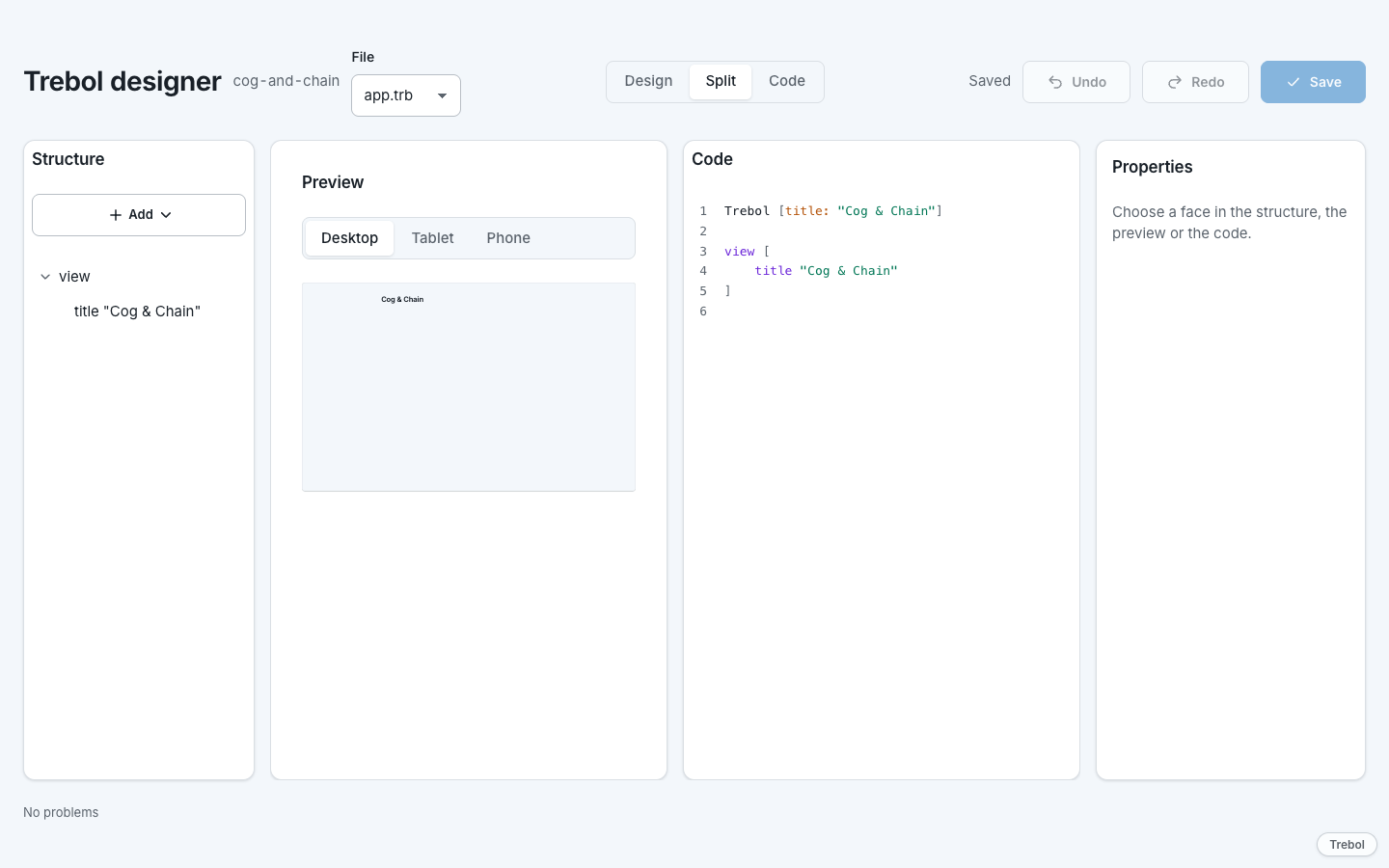
At the top
The name of the folder, and File: every
.trbfile of the project, outsidenode_modulesand hidden folders. Choose one to design it.Design / Split / Code: what the middle shows. Design gives it all to the preview, Code all to the code, Split shows both side by side.
Saved or Changed, Undo, Redo and Save. Changed says the file has changes not written to disk yet; Undo takes back the last change and Redo brings it back.
Structure, on the left: the faces of each view in the file, nested as they are written. A face that holds
others, a form, a panel, a screen, opens and closes with the arrow beside it. Add, above it, adds a face.
Preview, in the middle: the screen as it will look. The buttons above it show it as wide as a desktop (1280 × 800), a tablet (834 × 1112) or a phone (390 × 844). The preview lays the screen out without running the program, so a table, a list, a board or a chart shows a few made-up rows of the columns it has. When a face has a problem, a table under the preview says which and where.
Code, in the middle: the file itself, coloured as Trebol, with a bar beside the lines of the chosen face.
Properties, on the right: everything about the chosen face.
Drag the space between two columns to make one wider: a deep structure shows its names whole, and a long face has room in the properties. The arrow keys move it too, once it has the focus, and a double click gives the column back its first width. The browser keeps the widths for the next time. A name still cut short shows whole when the pointer rests on it.
At the bottom left, how many problems the file has.
The chosen face
Almost everything in the designer works on the chosen face. There are three ways to choose one, and they are the same:
click its row in the Structure;
click it in the Preview;
put the cursor in it in the Code.
A face chosen in one is chosen in all three: its row is marked in the structure, it is outlined in the preview, and its lines are marked in the code.
Each part of the window scrolls by itself; the window itself never does.
What’s next
The next page gives the counter of the shop its form, with the mouse.